
5 Awesome Excel Tips for Digital Marketers
by Anvil on September 25, 2013UncategorizedAs digital marketers, we interact with Excel on a daily basis. From running reports to analyzing large amounts of data most of us spend at least a few hours a day in a program people either love or hate. Knowing how to harness the power of excel can make our jobs easier. So let’s start with the basics and jump into some tips and tricks that I use on a daily basis.

1. Quickly Moving To The End of Data Sets
Data can range from a few rows to a few thousand rows, and while scrolling can eventually accomplish the same end goal, this trick can save you seconds, if not minutes.
Select a cell in the column or row you are working with and press CRTL + (arrow direction you want to move).
E.g. CTRL + Right Arrow will take you to the last full cell at the end of the row you’re in.
Need to select a whole row? Or Column? Try CRTL + SHIFT + (arrow direction).
To select a whole section of data use CRTL + SHIFT + (right or left) + (up or down).
2. Pivot Tables – Your (New) Best Friend
If you’re not already using pivot tables for your reporting you are missing out. Pivot tables are a great way to easily manipulate data to provide you with the information you need quickly. This post does not cover how to set them up, but can help with existing pivot tables.

Sorting Pivot Table Values
Sometimes creating pivot tables can cause your data to be out of order. Sorting this data can be done by selecting a cell within the pivot table and using the sort & filter function to sort A to Z or numerically.

Updating Pivot Tables
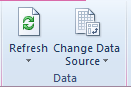
Once you build a beautiful pivot table (and some visual aides in the form of pivot graphs) you don’t need to reinvent the wheel. Adding additional data to your data source can easily be added in by making sure that it’s included in your data source and then hitting refresh. You can choose to either refresh all the pivot tables in the workbook or the one you have selected.
3. CONCATENATE
Concatenation can be very powerful if you need to combine content from multiple cells into one. The function can be written either as =CONCATENATE(A1:D3) or =CONCATENATE(A1,” “,B1,” “,C1,” “,D1). The first option will not create spaces between the cell values; the second way adds spaces in between cell values.
This is limited up to 30 cells.
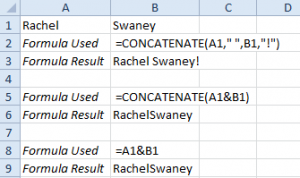
*You can also use the simple calculation operator and an ampersand to produce the same result.
4. Important Functions You Need To Know
=len(range) – counts the number of characters, including spaces, in a cell. Perfect for writing ad text, meta titles or meta descriptions.
=COUNTA(range) – counts the number of non-empty cells in a range.
=IF(logical_statement, return this if logical statement is true, return this if logical statement is false) – returns specified information (text, cell value, number) based on the logical statement. Example: If my meta description is over 155 say “Too Long”, if not say “You’re In The Clear”
5. Patterns in Data
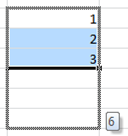
Excel is able to determine patterns in data and continue a pattern (2,4,6,8 or Monday, Tuesday, Wednesday). To have Excel finish a pattern all you need to do is start it, I usually give it three parts, select the cells and drag down.
Last but not least, if you or your coworkers cannot find a solution, there is a good chance that someone else has run into the problem. So pull up your favorite search engine and get to searching.